Sooner or later it happens to almost every underwater pilot: the drone is stuck. Usually it is not the drone itself that is trapped, but the tether that has wrapped around a branch, a line or a rock. The good news: in many cases you can get free with a calm head and a system.
Important up front: we have not experienced this situation ourselves. The plan is based on manufacturer manuals, on the emergency procedure of the professional ROV maker VideoRay, and on experience from forums. So it is an overview, not a hands-on test.
- First rule: don't panic and don't yank the tether. VideoRay stresses this in the very first sentence of its emergency procedure.
- Usually the tether is stuck, not the drone. Follow the tether back to find the spot.
- Typical traps: water plants, branches, mooring lines, anchor chains, nets and fishing lines.
- Prevention is easier than recovery: pay out little cable, avoid obstacles, plan a battery reserve.
- Diving in after it yourself is off limits without training.
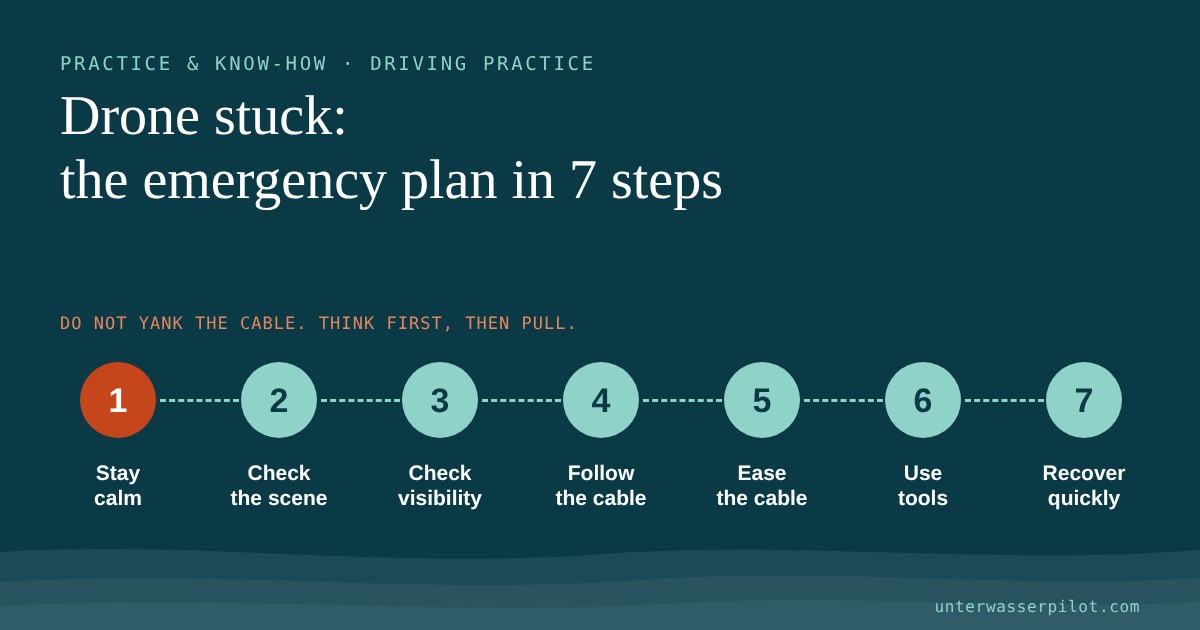
The emergency plan in 7 steps
1. Stay calm, don't pull
VideoRay, a maker of professional ROVs, opens its emergency procedure for a snagged tether with two clear sentences: Don't panic. Don't pull on the tether. In the Blue Robotics forum, too, an experienced user advises against jerking the cable, because it can snap. A hard tug often just pulls a knot tighter.
Let go of the thrusters for a moment and take your hand off the tether reel. Nothing gets rushed now.
2. Assess the situation
According to VideoRay, the first step is to assess the situation, before you move the drone. Ask yourself:
- Does the drone still respond to control inputs?
- Can you see on the screen what it is caught on?
- Is the tether taut, and which way is it pointing?
- How much battery do you have left?
If you are recording video, let it keep running. The footage helps you find the spot again later or explain the situation in the forum.
3. Check visibility
Switch the lights on if they are off, and tilt the camera up and down. VideoRay recommends turning the drone left and right and panning the camera to find the tether. If mud has been stirred up, often the only thing that helps is to wait briefly until visibility improves.
4. Follow the tether back
This is the most important step. VideoRay advises turning the drone around and following the tether back to the snag point. In the Blue Robotics forum, a user writes from experience that the tether often catches under rocks, and that reversing back the way you came usually frees the drone.
Here is how to go about it:
- Move slowly backwards or in the opposite direction, not at full throttle.
- Follow the path you came by. If the tether has wrapped around a post, retrace the loop in the opposite direction.
- Keep the tether slack while you do, so the drone has room to move.
5. Relieve the tether and change position
If the tether is under tension, you can help from above:
- Give a little cable. A loop often comes loose once the tension eases.
- Change the angle. From the shore you can walk a few metres along the jetty or bank; from a boat you can change position. A different pulling angle may lift the tether over an obstacle. According to the Blue Robotics forum, it also helps to work the vehicle free carefully from both ends of the boat.
- Gently, not with jerks. If the tether has no knots and cannot pull any tighter, VideoRay says you may also pull from above. Steadily, not with force.
From a boat, make sure the loose tether does not get into your own boat's propeller. That is exactly how, according to the trade magazine Salmon Business, a Blueye drone was lost in Norway: while manoeuvring, too much loose cable was hanging in the water, and the company suspects it was cut by the propeller.
6. Use tools
If your drone has a gripper arm, it can help release the tether, according to VideoRay. The skids or the frame can also be used to push the tether away. If you have a second drone to hand, you can use it to look at the situation from outside.
7. Once the drone is free: recover it promptly
As soon as the drone is free, fly it to the surface, haul in the tether and switch the drone off. VideoRay recommends switching off the power before unplugging. Afterwards, check the propellers and the tether: in the V6 quick start guide, QYSEA advises checking after every dive that no weed or fishing line has caught in the propellers. In the Gladius Mini manual, Chasing names seagrass blocking the thrusters as a typical problem.
Mind the battery
A rescue attempt uses power. Chasing recommends not diving or charging below 25 percent, and in the Gladius Mini manual it excludes damage from operating despite a battery warning from the warranty. With FIFISH, according to QYSEA, the tether expressly also serves as a safety line you can use to recover the drone after a power failure. But if the drone is stuck, that is of little use. So don't let the whole battery drain while you are trying things out. More on this in Battery care: keep your drone going for many dives.
Typical traps
| Trap | Where it lurks | What helps |
|---|---|---|
| Water plants, seagrass | shallow shore zones, lakes in summer | Chasing lists clear water without dense seagrass as an operating condition; fly over rather than through |
| Branches, sunken trees | riverbanks, reservoirs | keep your distance, don't route the tether around branches |
| Mooring lines, buoy lines | harbours, marinas | according to the SeaHelp test a typical hazard in marinas; never circle lines |
| Anchor chains | anchorages, mooring-buoy fields | named as a tether trap in our article on currents |
| Nets, fishing lines | fishing spots, harbour basins | QYSEA warns about reefs, rocks, seagrass and fishing line |
| Rocks, crevices | rocky shores, reefs | according to the Blue Robotics forum the most common cause; reversing usually helps |
A real-world account: in its test of the Chasing Gladius Mini in the Adriatic, SeaHelp describes how the very agile drone risks getting tangled, and names mooring lines in the marina as a typical obstacle.

How to prevent it
- Pay out little cable. The less cable lies in the water, the less can snag. How to handle the tether in a current is covered in Flying in currents: how to stay in control.
- Mark the tether. In the Blue Robotics forum, a team that investigates wrecks in the Great Lakes with a modified BlueROV2 describes marking its tether. If a lot more cable is out than the depth explains, that is a sign of a loop or snag point.
- Work as a pair. The same team works with one pilot and a second person who only handles the tether. Both talk constantly about depth and cable length.
- No circles around obstacles. Every lap around a post or a buoy is a noose.
- Check the surroundings. QYSEA advises paying attention to tides, water level and ship traffic.
- Battery reserve. Turn back in good time so that there is power left for a rescue attempt.
You will find the complete preparation in the Before your first dive: the ROV checklist for beginners. Why the tether is needed in the first place is explained in Why ROVs need a tether: the physics behind the leash.

When to give up, and who to call
Sometimes it just doesn't work. If the drone stays stuck despite all your attempts, the battery is running low or the situation is getting worse:
- Don't dive in after it yourself if you have no diving training. Cold water, poor visibility and a tether you can get tangled in are dangerous for the inexperienced. A drone can be replaced, you can't.
- Note the position. Write down the place, the point on the shore, the cable length and, if displayed, the depth. Take photos from the shore. Don't just cut the tether; secure it on the shore or to a buoy if you want to try a recovery later. Bear in mind that a tether stretched through the water can become a hazard for swimmers and boats.
- Ask the professionals. Trained divers, for example from a dive club or a dive school nearby, can sometimes help. There are specialised providers for professional recovery.
- Emergency call only if people are in danger. If a person is in danger, call the European emergency number 112, which also works in Switzerland.
Safety first
- Bathers: Don't dive where people are swimming. A tether in the water is a trap for swimmers, and according to QYSEA you must not touch running propellers.
- Shipping: No diving in shipping lanes. Besides the danger to your drone, a cable in a shipping lane can put others at risk too.
- Water rules: Whether and where underwater drones are allowed is regulated differently by each body of water or authority. A dedicated overview of the legal situation is planned.
Rehearse the emergency once on dry land or in shallow, clear water: deliberately lay the tether around a post, then reverse and follow the tether. Once you have practised the sequence, you will stay calmer in a real emergency.
Frequently asked questions
Can I just pull the tether free with force?
Better not. VideoRay and users in the Blue Robotics forum expressly advise against it. According to QYSEA the FIFISH tether can take 80 to 100 kgf, but the connector, the drone or the obstacle may give way first, and a knot often pulls tighter.
What do I do if the picture is gone?
Without a picture you can't follow the tether back. Then all that is left is to haul in the tether carefully and steadily from above, changing the pulling angle as you do. If there is no progress: note the position and get professional help.
Does the warranty cover it if the drone gets stuck?
We have not checked this across the board. QYSEA excludes damage from strong currents or large waves from its warranty, and Chasing excludes damage from operating despite a battery warning. Read your manufacturer's warranty terms.
How do I stop fishing lines from catching in the propeller?
Avoid fishing spots and check the propellers after every dive, as QYSEA recommends.
Have you ever managed to free a drone, or did it stay down there? Tell us in the Unterwasserpilot forum (in German, English posts welcome). Your experience helps others.
You can find reactions and comments on this article in the Unterwasserpilot forum (in German, English posts welcome).
- VideoRay: Emergency Response to a Snagged Tether/ROV (emergency procedure: don't pull, assess the situation, retrace the tether, use gripper arm/skids, second ROV, power off before unplugging)
- Blue Robotics Forum: “ROV Snagged On Submerged Object” (July 2021; user ktweed: don't yank, trace the tether back, snags often under rocks, reversing helps; work free from both ends of the boat. User Truenorthmark: tether markings, pilot + tether handler)
- QYSEA: FIFISH V6/V6s Quick Start Guide V1.4 (via Adorama; avoid reefs, rocks, seagrass, fishing line; watch tides, water level, ship traffic; don't touch propellers; check for seagrass/fishing line after the dive; 80 kgf; pull only by the tether)
- QYSEA Support FAQ: “What is the purpose of the tether?” (safety line in a power failure, Kevlar approx. 80 kg)
- QYSEA Store: 100 m Tether Spool (100 kgf)
- Chasing: Gladius Mini User Manual (via Adorama; clear water without dense seagrass; check thrusters for seagrass; charge below 25%; operation despite battery warning excluded from warranty)
- SeaHelp News: “Unterwasser-Drohne Gladius Mini: ideal für die Adria” (Wolfgang Kröger, 18 July 2019, updated 5 January 2020; tangling, mooring lines in the marina; article in German)
- Salmon Business: “Underwater drone worth EUR 10,000 suddenly lost” (13 February 2020; Blueye drone, too much loose cable, probably cut by the propeller)
- Zivilschutz Steiermark: “Sicher in den Urlaub mit 112” (112 applies in the EU and Switzerland; document in German)
- Unterwasserpilot: Flying in currents: how to stay in control (anchor chains as a tether trap, no diving in shipping lanes, QYSEA warranty exclusion for currents/waves; documented there with the QYSEA Warranty Policy)
- Unterwasserpilot: Battery care: keep your drone going for many dives (Chasing recommendation of 25%)
Lost something important underwater that a hobby drone can no longer recover? UDRA offers professional recovery missions in Austria.