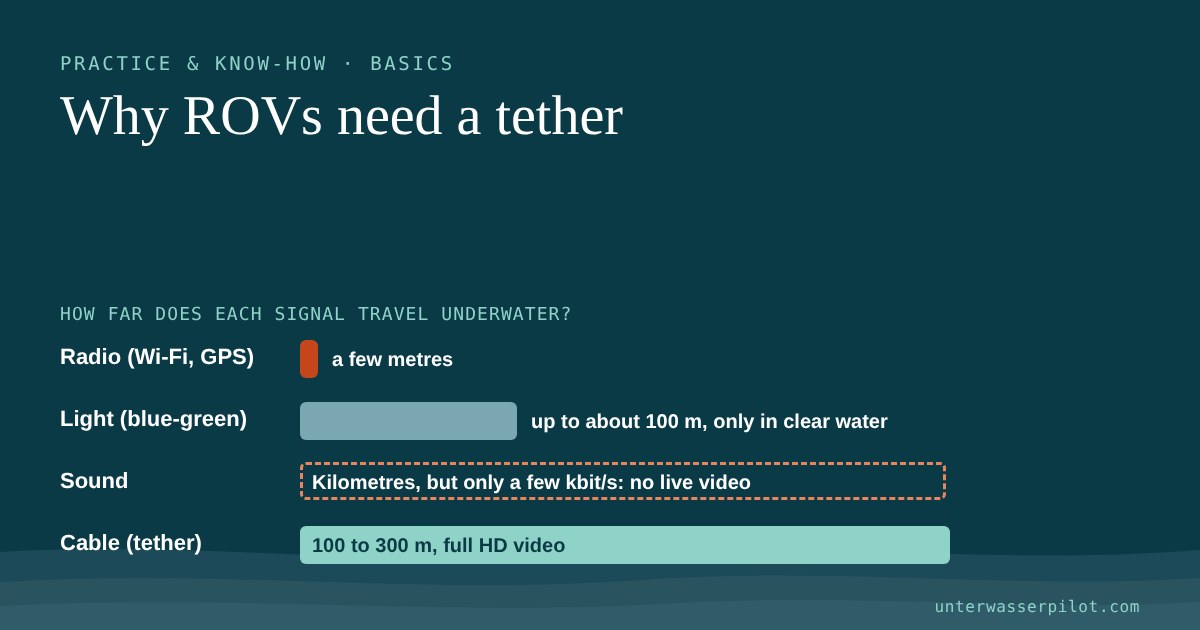
When you unpack an underwater drone for the first time, the big cable reel in the box often comes as a surprise. Why can't it work wirelessly, like a quadcopter or a remote-controlled car? The short answer: water swallows radio waves. The long answer is worth reading, because once you know it, you also understand why the tether matters so much for the safety of your drone.
One thing up front: this is an assessment based on manufacturer information and scientific sources, not a hands-on test.
- Radio waves such as Wi-Fi or GPS barely get anywhere in water. Salt water conducts electricity and absorbs them especially strongly.
- Sound works underwater, but it is slow (around 1,500 metres per second) and carries only a few kilobits per second. That is not enough for live video.
- Depending on visibility, light manages around 100 metres at most, and far less in a murky lake.
- That is why ROVs hang on a cable (tether). It carries video and control commands and doubles as a safety line.
- According to the manufacturers, the cables of hobby drones are 100 to 300 metres long (up to 400 metres for the Chasing M2, according to a retailer) and reinforced with Kevlar.
Radio: it ends at the water surface
Wi-Fi, Bluetooth, mobile networks and GPS all work with electromagnetic waves. In air they travel almost unhindered. In water it looks very different: according to an overview paper by the Acoustic Research Laboratory at the National University of Singapore, electromagnetic waves propagate well in water only over very short distances. Even very low-frequency radio waves (around 10 kHz) only get a few metres.
In the sea a second effect comes on top: salt water is a good electrical conductor, and radio waves have a hard time passing through good conductors. That is why even submarines lose normal radio contact underwater. They use extremely low frequencies which, according to Wikipedia, only reach a few dozen metres deep and, in the very-low-frequency band, transmit just around 300 bits per second. For comparison: a smooth video stream needs many times that.
GPS is affected too. According to the education platform DOSITS (University of Rhode Island), the radio frequencies used by GPS cannot penetrate seawater. So an underwater drone cannot tell where it is by GPS once it is submerged.
For you as an underwater pilot, this means: as soon as the drone dives, a pure radio link would be gone.
Sound: it works, but it is too slow for video
Sound travels much further underwater than radio. There are acoustic modems that transmit data by sound. DOSITS describes them as relatively slow compared with modems on land.
The figures from the NUS paper make this clear:
- Sound travels at around 1,500 metres per second in water. A signal therefore needs about two thirds of a second for a kilometre. Radio arrives practically instantly.
- Acoustic links only manage low data rates; as an example, the paper cites a few kilobits per second over 10 kilometres. The longer the distance, the less bandwidth is left.
That is enough for a few readings or short commands. It is not enough for the live HD picture you steer your drone by.
Light: fast, but only over short distances
That leaves light. Optical links using blue-green light (roughly 450 to 550 nanometres) are absorbed least in water. According to the NUS paper, they still get no further than around 100 metres, and only in very clear water. In a murky gravel-pit lake or a river after rain, the range is much shorter.
The solution: the cable (tether)
Because radio, sound and light each hit their limits underwater, ROVs rely on the simplest solution: a cable. Professionals call it a "tether". On hobby drones it does several jobs, according to QYSEA:
- Data: It carries the live picture and control commands between the drone and the controller.
- Safety line: If the power fails, you can pull the drone back by the cable.
Incidentally, hobby drones carry their battery on board. So the cable is mainly a data line and a lifeline.
How the system works on FIFISH and Chasing
The set-up is similar on the common hobby drones: the drone hangs on the cable, the cable ends at the surface at the controller or cable reel, and from there the signal goes by Wi-Fi to your smartphone or tablet.

- QYSEA FIFISH V6/V6s: According to the quick start guide, you connect your phone to the controller's Wi-Fi network ("FIFISHRC_xxxx"). According to the data sheet, the controller supports 5 GHz Wi-Fi.
- Chasing Gladius Mini: According to the user manual, a Wi-Fi network called "Chasing_xxxx" appears, and you connect your mobile device to it. The default is 2.4 GHz; you can switch to 5 GHz in the settings. For the Gladius Mini S, too, Chasing lists a controller with Wi-Fi.
- Chasing Dory: According to the retailer B&H, the small Dory hangs on a 15-metre cable that leads to a floating Wi-Fi buoy. The buoy sends the picture to your phone, reportedly up to about 15 metres away. The cable dives, the buoy floats on top: this is how even the "wireless" Dory gets around the radio problem.
So Wi-Fi only bridges the stretch above the water. Underwater, everything runs through the cable.
What the cables can take: manufacturer figures
| Drone / accessory | Cable length (according to manufacturer or retailer) | Tensile strength | Note |
|---|---|---|---|
| QYSEA FIFISH V-EVO, V6 Expert, E-GO (cable spool) | 100 m, 200 m, 300 m | 100 kgf per shop | Kevlar; 100 m spool USD 429* |
| QYSEA FIFISH V6/V6s (older quick start guide) | depends on the package | 80 kgf | QYSEA FAQ gives about 80 kg |
| Chasing Gladius Mini S | 100 m or 200 m | not stated | Controller with Wi-Fi |
| Chasing M2 | 100 m or 200 m | not stated | |
| Chasing M2 series (accessory cable, per retailer) | 200 m, 400 m | 100 kg (400 m) | neutrally buoyant per retailer, Kevlar |
| Chasing Dory | 15 m to the Wi-Fi buoy | not stated | Depth max. 15 m |
Prices without guarantee, as of October 2026. We have not checked euro and CHF prices. Technical data according to the manufacturer or retailer.

Two points stand out:
- Tensile strength: In its older quick start guide QYSEA gives 80 kgf, and in the current shop for the spools 100 kgf. That sounds like a lot, but a cable snagged on a branch can still be damaged, especially at the connectors and kinks. So never pull with force.
- Buoyancy: A good tether is neutrally buoyant, so it hovers in the water instead of sinking or floating. According to the retailer GlobalDroneHQ, the Chasing accessory cables are built this way. That is meant to reduce drag and stop the cable snagging on the bottom. For the FIFISH cables we found no manufacturer statement on buoyancy.
ROV or AUV: what is the difference?
Professionals use two kinds of underwater robot. The US ocean agency NOAA explains it like this:
- An ROV (Remotely Operated Vehicle) is connected to the surface by a cable. Steering and control signals run through the cable, and a person drives the vehicle in real time.
- An AUV (Autonomous Underwater Vehicle) travels without a cable. It carries out its mission without an operator stepping in and then returns to a predefined point where the data is read out.
So an AUV does not "see" live for you; it works through a programme. All the underwater drones in our ranking are ROVs. You can find more on the basic terms in What is an underwater drone? ROVs explained simply.
And what does that mean for you at the water?
The cable is your life insurance, but also your biggest weak point. It can snag on plants, branches, ropes or anchor chains, and in a current the water pulls hard on it. We describe how to handle the cable in a current in Flying in currents: how to stay in control. What to do if the drone gets stuck anyway is explained in Drone stuck? Your emergency plan, step by step.
Before every dive it is worth checking the cable: connector clean, sealing ring in place, no kinks or chafing. In the Gladius Mini manual, Chasing expressly advises checking the O-ring on the cable connector before every dive and replacing it if it is damaged. You can find the whole routine in our Before your first dive: the ROV checklist for beginners.
Only unreel as much cable as you need right now, and never leave it lying unattended on the shore. A loose tangle of cable on a jetty is a trip hazard for you and others, and it easily gets tangled when you pay it out.
Frequently asked questions
Are there underwater drones without a cable altogether?
Practically none for hobby pilots with a live picture. Even the Chasing Dory uses a 15-metre cable to the Wi-Fi buoy. Cable-free underwater robots (AUVs) exist in research, but they run a programme and deliver no live picture.
Can I simply extend the cable?
Manufacturers offer longer cable reels as accessories, for QYSEA for example 100, 200 and 300 metres. According to the QYSEA shop, the spools do not fit drones from other brands. We do not recommend home-made extensions, because the connectors have to be watertight.
Why does GPS not work underwater?
Because the radio frequencies used by GPS do not penetrate seawater. Underwater you need other positioning systems, for example sound-based ones.
May I lower the drone into the water and pull it out by the cable?
In the quick start guide for the V6, QYSEA says you should pull the drone by the cable only when lowering and recovering it. Smoothly and without force, of course. For other models, follow the relevant manual.
Will the cable hold if the drone gets stuck?
According to the manufacturer, the FIFISH cable holds 80 to 100 kgf of pull. Do not rely on it: pulling hard can damage the connector, the cable or the drone. Think first, then pull.
You can find reactions and comments on this article in the Unterwasserpilot forum (in German, English posts welcome).
- Acoustic Research Laboratory, National University of Singapore: “Underwater acoustic communications” (PDF): radio waves travel only very short distances in water, about 10 kHz a few metres; sound about 1,500 m/s; a few kbit/s over 10 km; optical blue-green 450–550 nm, max. about 100 m depending on water clarity
- Wikipedia: Communication with submarines (salt water as a good conductor, VLF about 30 m or “a few dozen metres”, about 300 bit/s)
- DOSITS (University of Rhode Island): Underwater GPS (GPS frequencies do not penetrate seawater)
- DOSITS: How is sound used to transmit data underwater? (acoustic modems relatively slow; radio does not propagate underwater)
- NOAA Ocean Service: What is the difference between an AUV and a ROV?
- QYSEA Store: 100 m Tether Spool (100 kgf, Kevlar, USD 429, compatible with V-EVO/V6 Expert/E-GO, not with other brands)
- QYSEA Store: 200 m Tether Spool (100 kgf)
- QYSEA Store: 300 m Tether Spool (100 kgf)
- QYSEA: FIFISH V6/V6s Quick Start Guide V1.4 (via Adorama; 80 kgf, Wi-Fi “FIFISHRC_xxxx”, 5 GHz, pull only by the cable)
- QYSEA Support FAQ “What is the purpose of the tether?” (communication/control, safety line, Kevlar about 80 kg)
- Chasing: Gladius Mini S Specs (cable 100/200 m, controller with Wi-Fi)
- Chasing: M2 Specs (cable 100/200 m)
- Chasing: Gladius Mini User Manual (via Adorama; Wi-Fi “Chasing_xxxx”, 2.4/5 GHz, check the O-ring on the connector, battery pull ring on the drone)
- GlobalDroneHQ (retailer): Chasing 200 m Tether (neutrally buoyant, for the M2 series)
- GlobalDroneHQ (retailer): Chasing 400 m Tether (neutral, 100 kg, Kevlar)
- B&H Photo (retailer): Chasing Dory (15 m cable to the Wi-Fi buoy, Wi-Fi up to 15 m, depth 15 m)
Lost something important underwater that a hobby drone can no longer recover? UDRA offers professional recovery missions in Austria.